Database Lab 8: Database Design and Normalization
This lab focused on database design principles through a comprehensive case study. The assignment required analyzing business reports, normalizing data through First, Second, and Third Normal Forms (1NF, 2NF, 3NF), and creating an Entity Relationship Diagram (ERD) using diagrams.net. This lab provided hands-on experience with the complete database design process from unnormalized reports to a fully normalized database schema.
Assignment Overview
The lab required students to:
- Normalize Reports: Analyze multiple business reports and normalize them through 1NF, 2NF, and 3NF
- Create ERD: Design an Entity Relationship Diagram with 11 entities and 11 relationships
- Document Process: Show rough normalization work demonstrating progression through normal forms
- Use diagrams.net: Create the ERD using https://app.diagrams.net (hand-drawn ERDs were not accepted)
Grading Criteria: - ERD (11 entities & 11 relationships): 16 points - Rough normalization work: 4 points
Case Study: Vintage Console Nation (VCN)
Vintage Console Nation is a company that specializes in buying vintage and clone game consoles from offshore suppliers (primarily in Pacific Rim countries) and distributing them to retailers. The company carries vintage and clone consoles for Playstation 1 and 2, Nintendo 64 and SNES, and Dreamcast, as well as controllers, memory packs, rumble packs, and related accessories.
Business Operations
Sales Process: - Sales orders come from field sales reps, inside sales reps (phone/fax/email), and a B2B web application - Common order entry application processes all orders: 1. Sales order header information entered (Customer ID, Sales Rep ID, etc.) 2. Line item information entered (Product ID, Quantity, etc.) 3. Inventory checked for availability and updated 4. Customer credit checked 5. Sales order written to database as open order 6. Shipping order sent to Distribution
Shipping and Invoicing: - When distribution ships product, data entered updates open order data (amount shipped, date of shipment) - Inventory is updated - Daily invoices written for all shipped orders - Customer A/R balances updated - Monthly customer statements generated
Inventory Management: - Inventory status can be analyzed at any time - When on-hand quantity reaches reorder point, purchase order written to vendor - Open purchase order entry inserted in database - When goods received, open purchase order and inventory updated - When vendor invoice received, A/P clerk matches invoice to open purchase order - At month-end, cheques written to vendors and invoices paid updated in database
Business Reports Analysis
The case study provided several sample reports that needed to be analyzed and normalized:
1. Sales Order Report
Sales Order ID: 20115
Order Date: 12-Apr-2022
Customer ID: 7802
Name: Gray Market Electronics
Address: 1175 Jolly Roger Blvd., Ancaster, ON, L9T 3Y7

Item ID | Description          | Quantity | Price  | Amount
--------|---------------------|----------|--------|----------
304     | SONY PS 2 Clone     | 50       | 50.00  | 2,500.00
452     | MS Controller Clone | 20       | 10.00  | 200.00
                                    Total: 2,700.00
Key Observations: - One sales order can have multiple line items - Customer information repeated for each order - Item descriptions and prices stored with order
2. Invoice Report
Invoice ID: 25154
Invoice Date: 19-Apr-2022
Sales Order ID: 20115
Customer ID: 7802
Name: Gray Market Electronics
Address: 1175 Jolly Roger Blvd., Ancaster, ON, L9T 3Y7

Item ID | Description      | Quantity | Price  | Amount
--------|------------------|----------|--------|----------
304     | SONY PS 2 Clone   | 10       | 50.00  | 500.00
                              Total: 500.00
Key Observations: - Invoice linked to sales order - Partial shipment (only 10 of 50 items shipped) - Customer information duplicated from sales order
3. Inventory Status Report
Item ID | Description    | On Hand | Allocated | On Order | Available
--------|----------------|---------|-----------|----------|----------
281     | Memory Pack    | 48      | 28        | 50       | 70
307     | PS 2 Stand     | 12      | 5         | 10       | 17

Formula: (On Hand) - (Allocated) + (On Order) = Available
Key Observations: - Available is a calculated field (derived attribute) - On Order represents items from purchase orders not yet received
4. Purchase Order Report
Purchase Order ID: 31087
Order Date: 11-Apr-2022
Vendor ID: 403
Name: Knock Off Electronics
Address: 318 Greasy Jungle Rd., Kuala Lampur, Malaysia

Item ID | Description          | Quantity | Cost   | Amount
--------|---------------------|----------|--------|----------
215     | PS 1 Controller Clone| 10      | 5.00   | 50.00
219     | PS 1 Screen         | 25       | 12.00  | 300.00
304     | SONY PS 2 Clone      | 20       | 45.00  | 900.00
307     | PS 2 Stand          | 10       | 8.00   | 80.00
                                    Total: 1,330.00
Key Observations: - One purchase order can have multiple line items - Vendor information repeated for each purchase order - Cost represents purchase price (different from sales price)
5. Items On Order Report
Vendor | Purchase | Item ID | Description          | Quantity
ID     | Order ID |         |                      |
-------|----------|---------|---------------------|----------
403    | 31087    | 215     | PS 1 Controller Clone| 10
518    | 32034    | 215     | PS 1 Controller Clone| 25
403    | 31087    | 219     | PS 1 Screen         | 25
188    | 30095    | 275     | Rumble Pack         | 20
403    | 31087    | 304     | SONY PS 2 Clone     | 20
403    | 31087    | 307     | PS 2 Stand         | 10
52     | 32354    | 452     | MS Controller Clone| 25
Key Observations: - Many-to-many relationship between items and purchase orders - Same item can appear on multiple purchase orders - Same purchase order can have multiple items
6. Accounts Payable Inquiry
Invoice To Be Paid By: 15-Apr-2022

Vendor ID | Name                  | Invoice ID | Amount
----------|----------------------|------------|----------
403       | Knock Off Electronics | 421        | 10,000.00
518       | Midnight Micro        | 11087      | 5,000.00
518       | Midnight Micro        | 11342      | 3,000.00
644       | Copy Cat Mfg.         | P-904-91   | 2,000.00
704       | Pirate Cove Works     | 11087      | 450.00
Key Observations: - Vendor invoices can have duplicate invoice numbers across vendors (e.g., 11087 appears for both vendor 518 and 704) - This requires composite key: vendor_id + vendor_invoice_id - Many companies use voucher systems with internal document numbers
7. A/P Cheque Report
Date: 30-Apr-2022
Cheque Number: 55041
Vendor ID: 403
Name: Knock Off Electronics
Amount: $22,000.00
Key Observations: - Cheques are payments to vendors - One cheque can pay multiple vendor invoices
8. Open Purchase Order Inquiry
Purchase Order ID | Vendor ID | Item ID | Quantity | Order Date
------------------|-----------|---------|----------|------------
29932             | 403       | 215     | 25       | 15-Feb-2022
29932             | 403       | 291     | 50       | 15-Feb-2022
29945             | 644       | 275     | 12       | 22-Feb-2022
29945             | 644       | 304     | 10       | 22-Feb-2022
Key Observations: - Tracks outstanding purchase orders (goods not yet received) - Primary interest: overdue purchase orders
Normalization Process
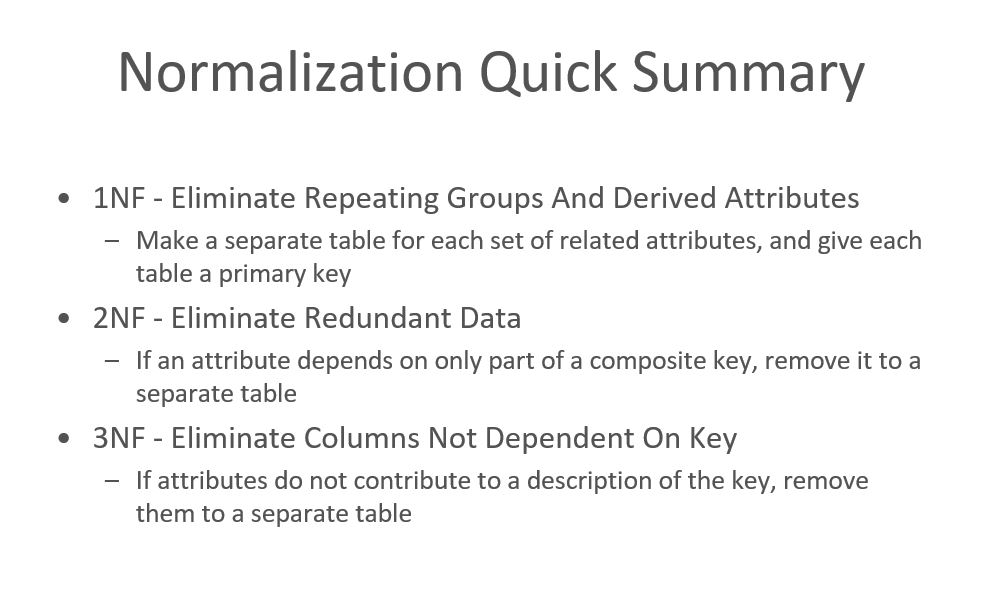
Normalization is the process of organizing data to minimize redundancy and prevent storage anomalies. The lab required progressing through three normal forms:
First Normal Form (1NF)
Rule: Eliminate Repeating Groups And Derived Attributes
How to Achieve: Make a separate table for each set of related attributes, and give each table a primary key.
Key Steps: 1. Remove repeating groups (e.g., multiple items in one order row) 2. Create separate rows for each item 3. Eliminate derived attributes (e.g., "Available" calculated from On Hand, Allocated, On Order) 4. Ensure each cell contains atomic (indivisible) values
Example - Sales Order Before 1NF:
┌─────────────┬──────────────┬─────────────────────────────────────┐
│ Sales Order │ Customer     │ Items (repeating group)             │
│ ID          │              │                                     │
├─────────────┼──────────────┼─────────────────────────────────────┤
│ 20115       │ Gray Market  │ Item 304: 50 @ $50 = $2,500        │
│             │ Electronics  │ Item 452: 20 @ $10 = $200           │
└─────────────┴──────────────┴─────────────────────────────────────┘
After 1NF:
Sales_Orders Table:
┌─────────────┬──────────────┬──────────┬──────────┬──────────┐
│ sales_order_│ customer_id   │ order_   │ item_id  │ quantity │
│ id          │               │ date     │          │          │
├─────────────┼──────────────┼──────────┼──────────┼──────────┤
│ 20115       │ 7802          │ 12-Apr-22│ 304      │ 50       │
│ 20115       │ 7802          │ 12-Apr-22│ 452      │ 20       │
└─────────────┴──────────────┴──────────┴──────────┴──────────┘
Second Normal Form (2NF)
Rule: Eliminate Redundant Data
How to Achieve: If an attribute depends on only part of a composite key, remove it to a separate table.
Key Steps: 1. Must already be in 1NF 2. Identify partial dependencies 3. Remove attributes that depend on only part of the composite key 4. Create separate tables for those attributes
Example - Sales Orders Before 2NF:
┌─────────────┬──────────────┬──────────┬──────────────┬──────────┐
│ sales_order_│ customer_id   │ item_id  │ description  │ price   │
│ id          │               │          │              │          │
├─────────────┼──────────────┼──────────┼──────────────┼──────────┤
│ 20115       │ 7802          │ 304      │ SONY PS 2   │ 50.00    │
│             │               │          │ Clone        │          │
│ 20115       │ 7802          │ 452      │ MS Controller│ 10.00    │
│             │               │          │ Clone        │          │
└─────────────┴──────────────┴──────────┴──────────────┴──────────┘
Problem: description and price depend only on item_id, not on the combination of sales_order_id and item_id.
After 2NF:
Sales_Orders Table:
┌─────────────┬──────────────┬──────────┬──────────┐
│ sales_order_│ customer_id   │ order_   │ item_id  │
│ id          │               │ date     │          │
├─────────────┼──────────────┼──────────┼──────────┤
│ 20115       │ 7802          │ 12-Apr-22│ 304      │
│ 20115       │ 7802          │ 12-Apr-22│ 452      │
└─────────────┴──────────────┴──────────┴──────────┘

sales_item_pricing Table:
┌──────────┬──────────────┬──────────┐
│ item_id   │ description  │ price  │
├──────────┼──────────────┼──────────┤
│ 304       │ SONY PS 2    │ 50.00   │
│           │ Clone        │         │
│ 452       │ MS Controller│ 10.00   │
│           │ Clone        │         │
└──────────┴──────────────┴──────────┘
Third Normal Form (3NF)
Rule: Eliminate Columns Not Dependent On Key
How to Achieve: If attributes do not contribute to a description of the key, remove them to a separate table.
Key Steps: 1. Must already be in 2NF 2. Identify transitive dependencies (non-key attributes depending on other non-key attributes) 3. Remove transitive dependencies 4. Create separate tables for those attributes
Example - Sales Orders Before 3NF:
┌─────────────┬──────────────┬──────────────┬──────────┬──────────┐
│ sales_order_│ customer_id   │ name        │ country  │ province│
│ id          │               │              │          │          │
├─────────────┼──────────────┼──────────────┼──────────┼──────────┤
│ 20115       │ 7802          │ Gray Market │ Canada   │ ON       │
│             │               │ Electronics │          │          │
└─────────────┴──────────────┴──────────────┴──────────┴──────────┘
Problem: name, country, province depend on customer_id, not on sales_order_id. These are customer attributes, not order attributes.
After 3NF:
Sales_Orders Table:
┌─────────────┬──────────────┬──────────┐
│ sales_order_│ customer_id   │ order_  │
│ id          │               │ date    │
├─────────────┼──────────────┼──────────┤
│ 20115       │ 7802          │ 12-Apr-22│
└─────────────┴──────────────┴──────────┘

Customers Table:
┌──────────────┬──────────────┬──────────┬──────────┐
│ customer_id   │ name        │ country  │ province │
├──────────────┼──────────────┼──────────┼──────────┤
│ 7802          │ Gray Market │ Canada   │ ON       │
│               │ Electronics │          │          │
└──────────────┴──────────────┴──────────┴──────────┘
Entity Relationship Diagram (ERD)
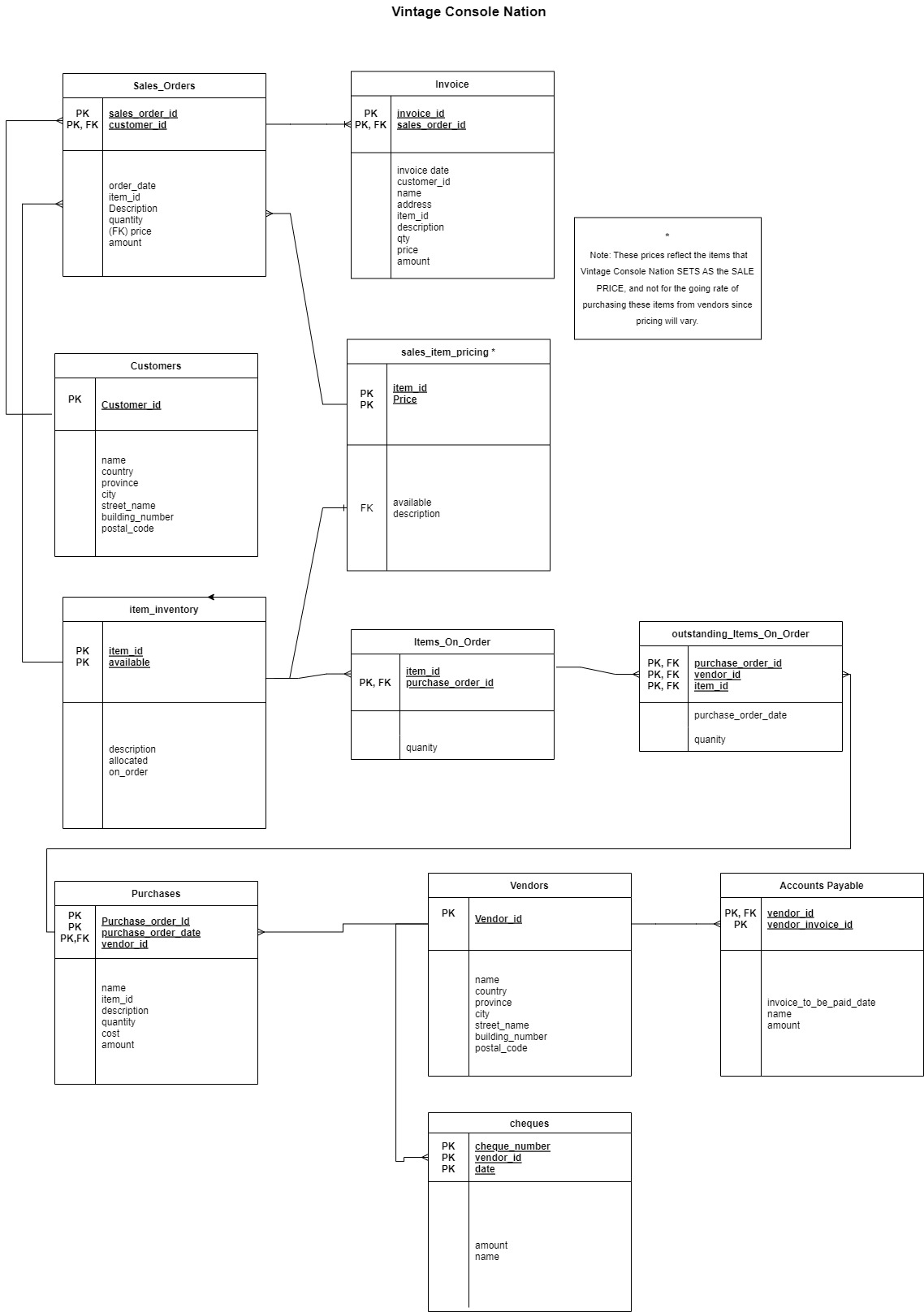
The final ERD for Vintage Console Nation contains 11 entities and 11 relationships, representing the complete normalized database structure.
Entities Identified
- Sales_Orders - Records customer sales orders
- Customers - Stores customer information
- Invoice - Records invoice details for shipped orders
- sales_item_pricing - Defines sales prices for items
- Item_inventory - Tracks inventory status
- Items_On_Order - Bridge table linking items to purchase orders
- outstanding_Items_On_Order - Tracks items on purchase orders not yet received
- Purchases - Records purchase orders to vendors
- Vendors - Stores vendor information
- Accounts Payable - Manages outstanding payments to vendors
- Cheques - Records cheque payments to vendors
Key Relationships
Sales Process: - Customers → Sales_Orders (1:M) - One customer can have many sales orders - Sales_Orders → Invoice (1:M) - One sales order can result in multiple invoices (partial shipments) - Sales_Orders → sales_item_pricing (via item_id) - Orders reference item pricing
Inventory Management: - Item_inventory → sales_item_pricing (1:M) - Items have pricing information - Item_inventory → Items_On_Order (1:M) - Items can be on multiple purchase orders - Items_On_Order → Purchases (M:1) - Multiple items link to one purchase order
Purchase Process: - Vendors → Purchases (1:M) - One vendor can have many purchase orders - Purchases → Items_On_Order (1:M) - One purchase order can have multiple items - Purchases → outstanding_Items_On_Order (1:M) - Tracks outstanding items
Accounts Payable: - Vendors → Accounts Payable (1:M) - One vendor can have multiple invoices - Vendors → Cheques (1:M) - One vendor can receive multiple cheques
Important Design Decisions
Composite Primary Keys:
- Sales_Orders: (sales_order_id, customer_id)
- Invoice: (invoice_id, sales_order_id)
- sales_item_pricing: (item_id, Price)
- Item_inventory: (item_id, available)
- Items_On_Order: (item_id, purchase_order_id)
- outstanding_Items_On_Order: (purchase_order_id, vendor_id, item_id)
- Purchases: (Purchase_order_Id, purchase_order_date, vendor_id)
- Accounts Payable: (vendor_id, vendor_invoice_id)
- Cheques: (cheque_number, vendor_id, date)
Foreign Key Labeling: - When a table has multiple foreign keys, they are labeled FK1, FK2, etc. for clarity
Derived Attributes: - The "Available" field in inventory is calculated as: (On Hand) - (Allocated) + (On Order) - This is not stored in the database but calculated when needed
Note on Pricing:
The prices in sales_item_pricing and Sales_Orders represent the sale price set by Vintage Console Nation, not the purchase cost from vendors. Purchase costs are stored separately in the Purchases table. This distinction is important for profit margin calculations.
Topics Learned
1. Database Normalization
Normalization Forms: - 1NF: Eliminates repeating groups and derived attributes - 2NF: Eliminates partial dependencies (attributes depending on part of composite key) - 3NF: Eliminates transitive dependencies (non-key attributes depending on other non-key attributes)
Benefits of Normalization: - Reduces data redundancy - Prevents update anomalies - Prevents insertion anomalies - Prevents deletion anomalies - Ensures data integrity
Storage Anomalies Prevented: - Insertion Anomaly: Can't insert customer without an order - Update Anomaly: Must update customer name in multiple places - Deletion Anomaly: Deleting last order loses customer information
2. Entity Relationship Modeling
ERD Components: - Entities: Represent real-world objects (tables) - Attributes: Properties of entities (columns) - Relationships: How entities connect (1:1, 1:M, M:M) - Primary Keys: Uniquely identify each row - Foreign Keys: Link related tables
Relationship Types: - One-to-Many (1:M): Most common (e.g., Customer → Orders) - Many-to-Many (M:M): Requires junction table (e.g., Items ↔ Purchase Orders via Items_On_Order) - One-to-One (1:1): Less common, often for security or performance
3. Composite Keys
When to Use: - When a single attribute cannot uniquely identify a row - Common in junction/bridge tables - Used when business rules require multiple attributes for uniqueness
Examples from Lab:
- Sales_Orders: (sales_order_id, customer_id) - Same sales order ID could theoretically exist for different customers
- Accounts Payable: (vendor_id, vendor_invoice_id) - Vendor invoice numbers can duplicate across vendors
4. Derived Attributes
Definition: Attributes that can be calculated from other attributes
Examples: - Inventory "Available" = On Hand - Allocated + On Order - Invoice "Amount" = Quantity × Price
Best Practice: Don't store derived attributes unless: - Calculation is expensive - Data is used frequently - Historical values need to be preserved
5. Business Rules in Database Design
Identifying Business Rules: - Analyze business processes and reports - Understand data relationships - Identify constraints and validations
Examples from VCN: - Sales prices are set by VCN, not vendors - Vendor invoice numbers can duplicate across vendors - Purchase orders can have partial shipments - Inventory available is calculated, not stored
6. Database Design Process
Steps Followed: 1. Analyze Requirements: Review business reports and processes 2. Identify Entities: Determine main objects/concepts 3. Identify Attributes: Determine properties of entities 4. Normalize Data: Progress through 1NF, 2NF, 3NF 5. Identify Relationships: Determine how entities connect 6. Create ERD: Visualize the database structure 7. Verify Design: Ensure all requirements are met
7. ERD Creation Tools
diagrams.net (draw.io): - Web-based diagramming tool - Free and accessible - Exports to multiple formats (PNG, XML, PDF) - Supports ERD notation - Allows collaboration
Best Practices: - Use consistent notation - Label all foreign keys clearly - Show cardinality (1:M, M:M) - Include all attributes - Use clear entity names
Key Design Patterns Demonstrated
1. Master-Detail Pattern
Sales Orders → Line Items: - One sales order header (master) - Multiple line items (detail) - Common pattern in order processing systems
2. Junction Table Pattern
Items ↔ Purchase Orders:
- Many-to-many relationship
- Requires Items_On_Order junction table
- Contains foreign keys to both entities
3. Status Tracking Pattern
Open Purchase Orders:
- outstanding_Items_On_Order tracks items not yet received
- Allows querying overdue orders
- Separates "on order" from "received"
4. Document Numbering Pattern
Composite Keys for Documents: - Sales orders, invoices, purchase orders use composite keys - Allows for distributed systems or multiple locations - Prevents conflicts in numbering
Common Challenges and Solutions
Challenge 1: Identifying Partial Dependencies
Problem: Determining which attributes depend on part of composite key vs. full key
Solution: Ask "Does this attribute describe the whole key or just part of it?" - Item description describes the item, not the order → Partial dependency - Order date describes the order, not the item → Full dependency
Challenge 2: Handling Duplicate Vendor Invoice Numbers
Problem: Same invoice number can exist for different vendors
Solution: Use composite key (vendor_id, vendor_invoice_id) - Ensures uniqueness across vendors - Reflects real-world business practice
Challenge 3: Calculating vs. Storing Derived Values
Problem: Should "Available" inventory be stored or calculated?
Solution: Calculate when needed - Reduces redundancy - Ensures consistency - Can be done via view or computed column
Challenge 4: Partial Shipments
Problem: One sales order can result in multiple invoices (partial shipments)
Solution: One-to-many relationship - Sales_Orders → Invoice (1:M) - Invoice references sales_order_id - Allows tracking of partial fulfillment
Real-World Applications
The concepts learned in this lab apply directly to real-world database design:
E-Commerce Systems: - Order processing (sales orders, invoices) - Inventory management - Customer management
Supply Chain Management: - Purchase orders - Vendor management - Accounts payable
Inventory Systems: - Stock tracking - Reorder points - Allocation management
Financial Systems: - Accounts receivable - Accounts payable - Payment processing
Conclusion
Lab 8 successfully demonstrated:
- ✅ Normalization Process: Progressing through 1NF, 2NF, and 3NF
- ✅ ERD Creation: Designing a complete database schema with 11 entities and 11 relationships
- ✅ Business Analysis: Analyzing real-world business reports to identify entities and relationships
- ✅ Database Design: Creating a normalized database structure that prevents anomalies
- ✅ Documentation: Documenting the normalization process and design decisions
This lab provided comprehensive experience with the complete database design lifecycle, from analyzing business requirements to creating a fully normalized database schema. These skills are essential for database administrators, data architects, and developers working on database design projects.
The Vintage Console Nation case study effectively demonstrated how normalization principles apply to real-world business scenarios, preparing students for professional database design work where they must balance normalization with performance, maintainability, and business requirements.